











Blog



Every A/R team knows the feeling: a payment lands in the bank, but finding which invoices it covers requires opening multiple systems, reading unstructured remittance notes, and making judgment calls. Multiply that across hundreds or thousands of transactions a month, and the manual effort becomes a serious drag on cash flow visibility and team capacity.
Transaction matching software exists to solve this. But “transaction matching” covers a wide spectrum of functionality, from basic rules engines to AI-powered platforms that handle even the messiest remittance data. Choosing the wrong tool can mean a failed implementation, poor adoption, and no meaningful improvement in your A/R metrics.
This guide is for A/R managers, controllers, and finance leaders who are evaluating their options seriously and want to make a decision that holds up over time.
At its core, transaction matching software compares incoming payments against open invoices and automatically applies them when a match is found. In practice, this involves pulling data from multiple sources including bank files, customer remittances, ERP records, lockboxes, and sometimes customer A/P portals and running them through a matching engine.
The cash application step is where most of the complexity lives. Payments rarely arrive with clean, complete remittance data. Customers sometimes send partial payments, lump multiple invoices into a single check, or reference internal PO numbers that don’t map directly to invoice numbers. Legacy remittance formats, paper-based lockbox data, and inconsistent payment notes add further friction.
Basic transaction matching software handles straightforward one-to-one matches. More sophisticated platforms can handle one-to-many and many-to-many matching scenarios, apply fuzzy logic to near-matches, and route exceptions to the right team members with context already populated. The gap between those two capability levels is significant and it’s where most A/R teams feel the pain most acutely.
The goal isn’t just speed. It’s accuracy, auditability, and the ability to close books faster with fewer open items requiring manual review.
Not all transaction matching automation software is built with A/R in mind. Some platforms are designed primarily for general ledger reconciliation or treasury operations. When evaluating tools for your A/R function, these are the features that matter most:
Evaluating software under time pressure or based on a demo that shows only the best-case scenarios leads to predictable problems post-implementation. Here are the pitfalls that catch A/R teams most often:
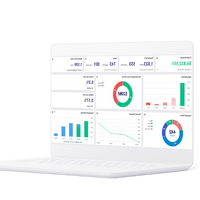
Take a 2-minute tour of Gaviti and see how integrated A/R automation drives faster, smarter decisions.
See Gaviti in ActionRule-based matching works well for straightforward transactions. But in most B2B A/R environments, a meaningful portion of payments don’t fit cleanly into predefined rules. That’s where AI-based transaction matching software changes the calculation.
AI engines, specifically machine learning models trained on historical payment and remittance data an identify matches that rule sets would miss. They learn customer-specific payment patterns, recognize remittance formats that vary by customer or payment method, and continuously improve their accuracy as they process more data.
The ROI impact is direct. Higher match rates mean fewer exceptions. Fewer exceptions mean less time spent on manual research and cash application. Less time on manual work means faster posting, which translates to better cash flow visibility, a lower DSO and fewer manpower hours.
There’s also a capacity argument. A team processing 10,000 transactions a month with a 90% straight-through match rate handles 1,000 exceptions. At 97%, that drops to 300. That’s a 70% reduction in exception volume from the same headcount, or the same headcount doing higher-value work.
AI-powered cash application doesn’t eliminate the need for human judgment but it narrows the field of cases where judgment is actually required.
These two terms are sometimes used interchangeably, but they describe meaningfully different problems.
General ledger matching is primarily about reconciling account balances across periods ensuring debits and credits net correctly, that intercompany entries balance, and that the ledger is accurate at close. The focus is accounting integrity and period-end accuracy.
Accounts receivable matching is about applying customer payments to open invoices as they arrive continuously, in real time, throughout the month. The challenge is operational, not just accounting. It involves incomplete remittance data, customer deductions, partial payments, and the downstream impact on collections workflows.
A/R matching software needs to integrate with collections processes. When a payment is applied, the corresponding open invoice should drop off the collector’s worklist automatically. When a payment falls short or a customer takes an unauthorized deduction, the system should route that discrepancy into a dispute or collections workflow immediately, not sit as an unmatched item until someone manually reviews the exception queue.
This integration between payment matching and order and transaction matching workflows is what separates true A/R platforms from general-purpose reconciliation tools. If cash application and collections operate in separate systems with no real-time data exchange, your team is always working from incomplete information.
Finance leaders evaluating transaction matching software often need to justify the investment internally. A credible business case requires connecting the software’s capabilities to measurable outcomes your organization cares about.
Start with your baseline. How many transactions does your team process monthly? What percentage are matched automatically today versus requiring manual intervention? How many FTE hours are spent on cash application and exception resolution? What’s your current DSO, and what would a one-day improvement in DSO mean for your cash position?
Then quantify the improvement scenarios. If your current manual match rate is 70% and a new platform can get you to 93%, you’re eliminating roughly 23% of your exception volume. Translate that into hours saved, staffing implications, and faster cash posting. If your average days-to-apply drops from five days to one, calculate the working capital impact at your revenue volume.
Don’t forget the indirect benefits. Fewer exceptions mean fewer disputes triggered by misapplied payments. Faster cash application means your collections team is working from accurate aging data not chasing invoices that have already been paid. Better data means better forecasting.
A practical business case for the best cash application software solutions doesn’t need to be complicated. It needs to be honest about your current state and specific about what you expect to improve and by how much.
Gaviti’s cash application module is built specifically for A/R teams not as a standalone tool, but as an integrated part of a broader A/R management platform. That distinction matters in practice.
When a payment is matched and applied in Gaviti, the result flows immediately into the collections workflow. Open invoices disappear from collector queues. Partial payments trigger the right follow-up. Disputes are routed and tracked. The matching event isn’t isolated; it drives downstream A/R activity automatically.
Gaviti achieves 100% match accuracy when customers pay through its self-service payment portal, and a 95% overall match rate across all payment types, including lockbox data and unstructured remittance. The platform connects to any ERP including legacy systems and supports multiple bank accounts and remittance sources.
For A/R teams that are tired of managing cash application in one system and collections in another, Gaviti offers a genuinely integrated alternative. The ROI isn’t just in match rate improvement it’s in the elimination of the gap between when cash arrives and when your team can act on it.
Transaction matching software automatically pairs incoming payments with the open invoices they cover, typically in real time as payments arrive. Account reconciliation is a broader accounting process that confirms ledger balances are accurate at period end. Matching is operational and continuous; reconciliation is accounting-focused and periodic. Many A/R teams need both, but they serve different functions.
Leading AI-based platforms typically achieve straight-through match rates between 90% and 97% on mixed payment data. The exact rate depends on your remittance quality, payment complexity, and customer behavior. Vendors claiming higher rates without qualification should be asked to demonstrate performance on a representative sample of your actual transaction data, not a curated demo dataset.
The most common mistakes are accepting vendor match rate claims without validation, underestimating ERP integration complexity, and selecting a general reconciliation tool for an A/R-specific workflow. Teams also frequently underestimate exception volume and end up with software that doesn’t support the resolution workflows their team actually needs day-to-day.
Yes, most enterprise-grade transaction matching platforms offer ERP integration, but the depth varies significantly. Some provide pre-built native connectors with bidirectional sync; others require custom API development. Before committing, confirm exactly how the integration works with your specific ERP version, how frequently data syncs, and what happens to records that don’t reconcile automatically.
Start with your current transaction volume, manual match rate, and hours spent on exception handling. Estimate the improvement the software delivers in match rate, processing time, and DSO. Convert each improvement into a dollar figure: labor savings, working capital release from faster posting, and reduced write-offs from better dispute visibility. Compare that total to the three-year cost of ownership, including implementation and support.













Link is copied!
Contact us!
Welcome back